Monday, September 30, 2019

How to Move SQL Server MDF and LDF Files?

I personally use the following method to move the data and log files for my customers. Let us learn that step by step.
Let us assume that we want to move database SQLAuthority from their D drive to E drive on my machine.
Step 1: Original Location
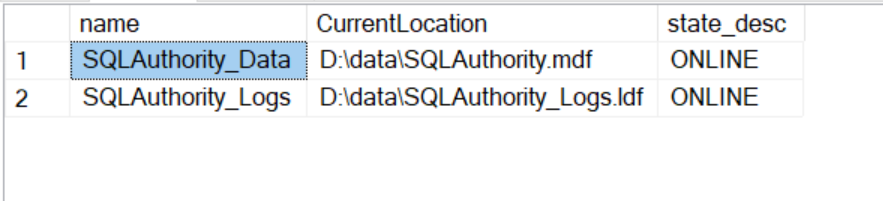
First, we will get the location of the physical files using the following command.
1
2
3
SELECT name, physical_name AS CurrentLocation, state_desc
FROM sys.master_files
WHERE database_id = DB_ID(N'SQLAuthority');
How to Move SQL Server MDF and LDF Files? - Interview Question of the Week #189 physicalmove1
Step 2: Take Database Offline
You can take the database offline running following command.
1
ALTER DATABASE SQLAuthority SET OFFLINE;
Step 3: Move Files – MDF and LDF
Now in this step, you will have to move your database files from the original location to the new location.
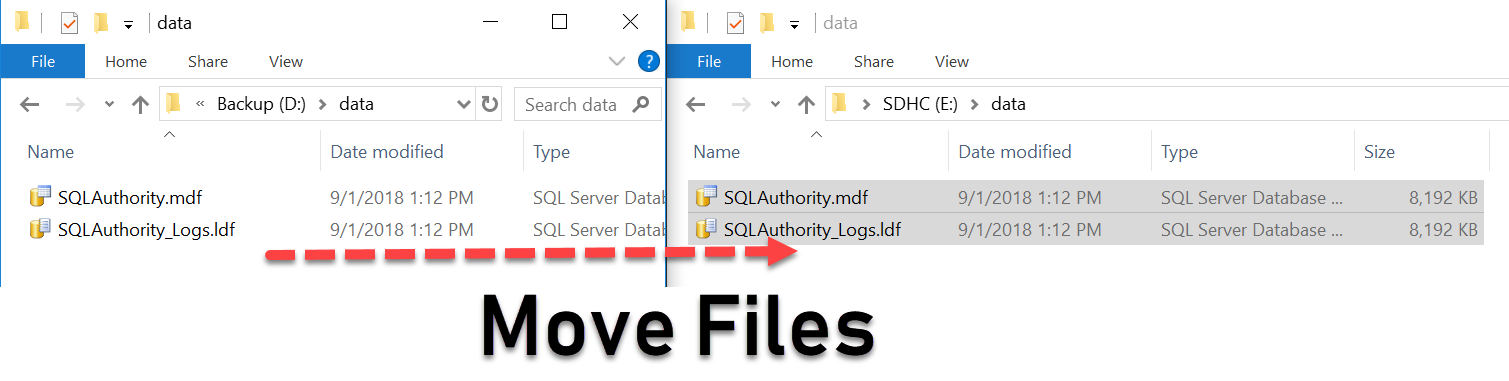
How to Move SQL Server MDF and LDF Files? - Interview Question of the Week #189 physicalmove2
Step 4: Change the file location inside SQL Server
Running following command will change the location of the file for SQL Server.
1
2
3
4
5
ALTER DATABASE SQLAuthority
MODIFY FILE ( NAME = SQLAuthority_Data, FILENAME = 'E:\data\SQLAuthority.mdf' );
ALTER DATABASE SQLAuthority
MODIFY FILE ( NAME = SQLAuthority_Logs, FILENAME = 'E:\data\SQLAuthority_Logs.ldf' );
GO
Step 5: Bring Database Online
Now run following command to bring the database online.
1
ALTER DATABASE SQLAuthority SET ONLINE;
Step 6: Check the database file location
You can verify your database move by running following command.
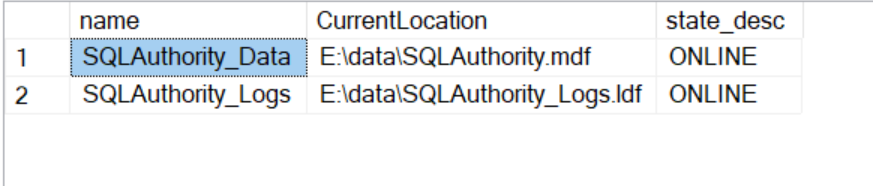
How to Move SQL Server MDF and LDF Files? - Interview Question of the Week #189 physicalmove3
Well, that’s it. You do not have use older method of Detach or Attach anymore if you want to move your database.

How to Rename a Column Name or Table Name in SQL

The script for renaming any column :
sp_RENAME 'TableName.[OldColumnName]' '[NewColumnName]''COLUMN'
 The script for renaming any object (table, sp etc) :
sp_RENAME '[OldTableName]' '[NewTableName]'
This article demonstrates two examples of renaming database object.
  1. Renaming database table column to new name.
  2. Renaming database table to new name.
In both the cases we will first see existing table. Rename the object. Test object again with new name.
1. Renaming database table column to new name.
Example uses AdventureWorks database. A small table with name “Table_First” is created. Table has two fields ID and Name.
SQL SERVER - How to Rename a Column Name or Table Name spRename1
Solarwinds
Now, to change the Column Name from “Name” to “NameChange” we can use command:
USE AdventureWorks
GO
sp_RENAME 'Table_First.Name''NameChange'COLUMN'GO
Following Fig. show use of SP_RENAME Command
SQL SERVER - How to Rename a Column Name or Table Name spRename2
You can see the column name “Name” is now changed to “NameChange“.
USE AdventureWorks
GO
SELECT *FROM Table_First
GO
Following fig. verify that the column name has been changed.
SQL SERVER - How to Rename a Column Name or Table Name spRename3
2.Renaming database table to new name.
We can change the table name too with the same command.
sp_RENAME 'Table_First''Table_Last'GO
Following fig. Shows how we can change Table Name.
SQL SERVER - How to Rename a Column Name or Table Name spRename4
Now, the table name “Table_First” is renamed as “Table_Last”.
“Table_First” will no longer be available in database. We can verify this by running script:
USE AdventureWorks
GO
SELECT *FROM Table_First
GO
The Messages shows an error “Invalid object name ‘Table_First’.”
To check that the new renamed table exist in database run script:
USE AdventureWorks
GO
SELECT *FROM Table_Last
GO
SQL SERVER - How to Rename a Column Name or Table Name spRename6
You can see the same data now available in new table named “Table_Last”

Saturday, September 28, 2019

SQL Server – Find Primary Key Using SQL Server Management Studio

Running queries is always good… but this can be done very easily using Enterprise Manager (SQL Server 2000 ) or SSMS ( SQL Server 2005)
1. SQL Server 2000
Open Enterprise manager -> expand server -> expand database -> expand tables -> on the right side-> right click table name -> design table ->
now you can see all the columns in that tables also you can see some primary key on one or more than one column, if you want to add one more column in the primary key, just do the following,
1. First remove allow null check on that column.
2. Press the control button and select all the column you want to be in your primary ( include previous primary key columns as well)
3. Now right click the select columns, select Set Primary key.
4. On the top, save the table.
Just to check again, refresh database open table – design and see if you can see the primary key includes your new column.
2. SQL Server 2005
Expand Server- Database – tables – keys – right click key name and click modify, do the same process you did in SQL Server 2000, first you will uncheck allow null on that column, and then you will press control button and you will select all the columns you want to have in primary keys and then right click on those selected column, select set primary key.
at the top, click save and check once again if the changes has taken place.
One more thing, if you are using Varchar(max), text, ntext,nvarchar(max), image datatypes, then I dont think you will be able to set primary key, if you have any varchar(max) columns then try to give a fix values to those columns, like varchar(100).
Now your question remains the same, which one is primary key, what is the name of the primary key?
In SQL Server 2005, you can easily detect what is your primary key (under database – tables – keys), because the range color of primary key is different from foreign keys which is gray color, and there can be only one primary key on one table.
In SQL Server 2000 it is difficult to see as primary key and a foreign key.
Try running these script, which will give you all primary key on all tables in the database including column information.
SELECT A.TABLE_NAMEA.CONSTRAINT_NAMEB.COLUMN_NAMEFROM INFORMATION_SCHEMA.TABLE_CONSTRAINTS AINFORMATION_SCHEMA.CONSTRAINT_COLUMN_USAGE BWHERE CONSTRAINT_TYPE 'PRIMARY KEY' AND A.CONSTRAINT_NAME B.CONSTRAINT_NAMEORDER BY A.TABLE_NAME
Sometimes you will see the primary constraint name repeats, meaning that primary key is a composite key.
So now you have Primary Key constraint names and I told you procedure , you can do like that or what ever procedure you were trying to do earlier, I guess you were trying to drop primary key and then create a new primary key on the table. You can do this as well.
Make sure no users are connected to that database, because when you create a primary key, by default a clustered index is created, clustered actually physically stores the data, meaning the tables on which you are trying to create primary key will be un available for users.